The goal
Students keep their week in four places: the school's learning system, a calendar, a grades spreadsheet and their head. Schoolify brings that into one app that is open on every device they use, and it has to be something a student can trust with their school data.
The shape of it
It is one Turborepo monorepo. The apps are thin, and the real logic lives in shared packages, so a fix lands on every platform at once.
- core holds the rules, like grade math and time handling, with no platform code in it.
- sync holds an adapter for each school and learning system, so adding a school does not touch the apps.
- tokens is the design system, shared by the web and the phone app so they look like one product.
- The database is in Canada, and row-level security has been on since the first migration. Every query is scoped to the student who made it.
Connecting to school, safely
The easy way to read a student's courses is to ask for their school password or an access token. Schoolify does neither. It reads the calendar feed the school already publishes for each student, and adds proper sign-in with each school once that school issues access. Asking for a school login inside the app is never shipped in the store builds.
The time zone bug that was not ours
British Columbia moved to permanent daylight time on March 8, 2026. A student app lives on times, so I checked what each part of the stack believed. Of the 9 runtimes I measured, 8 shipped time zone data too old to know about the change. The database was the worst, still on 2025 rules.
The fix is to never trust the platform on this. The app ships its own rule for Vancouver and checks it at startup, and the database is never asked to convert a local Vancouver time. Class at 10:30 stays at 10:30.
Privacy as a feature
- Date of birth is kept in a private schema, away from the rest of the profile.
- Onboarding goes through one server function, and no other write is allowed until it has run. Signing up with Google or Apple cannot skip the age check.
- Students can delete their account themselves, with a 7-day grace period that signing back in cancels, and export their data through a link that expires after 7 days.
- User data is never sold.
Designing Wayfinder
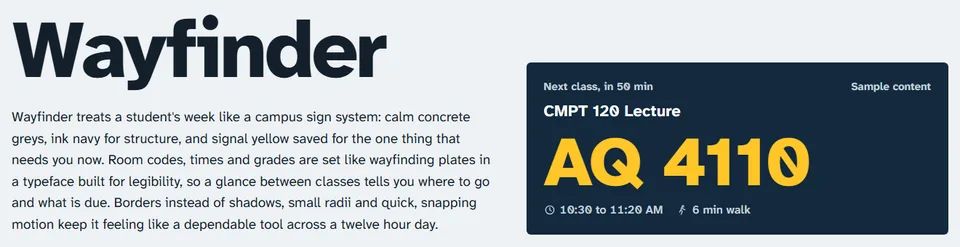
The look is based on campus signs. Calm greys and ink navy carry the layout, and signal yellow is saved for the one thing that needs you now. Room codes are set like the plates outside a lecture hall, in Atkinson Hyperlegible, a typeface made for reading at a glance between classes.

What I took from it
- Check the assumptions nobody checks. Time zone data looked like a solved problem until I measured it.
- Deciding what the app will never do, like asking for a school password, made the rest of the design easier.
- Shared packages first, apps second. The three apps are mostly wiring.